Interactive demo: the Lazega advice network
A printed page shows one layout, one palette and one size scale. The option interactive of nwplot writes the
same network as a web page that you can move around in. This page lets you try it without installing anything:
the view below is an ordinary file produced by nwplot. It works in your browser and does not contact any server.
If you are reading the book Network Analysis with Stata (forthcoming, Stata Press), this is the live version of the kind of view that its section on interactive plots describes. Reading the book is not needed to use the page, and the page does not need Stata.
The network
The data are the advice network of the 71 lawyers of a corporate law firm (Lazega 2001). A tie runs from a
lawyer to the colleague whom she asks for advice; there are 892 ties. In the view, color is the office
(Boston, Hartford, Providence), shape is the practice (corporate or litigation) and size is the number of
colleagues who ask the lawyer for advice (indegree). Labels are the node identifiers (n1 to n71).
The side panel needs about 900 pixels of width. On a phone or in a narrow window, open the view in its own page.
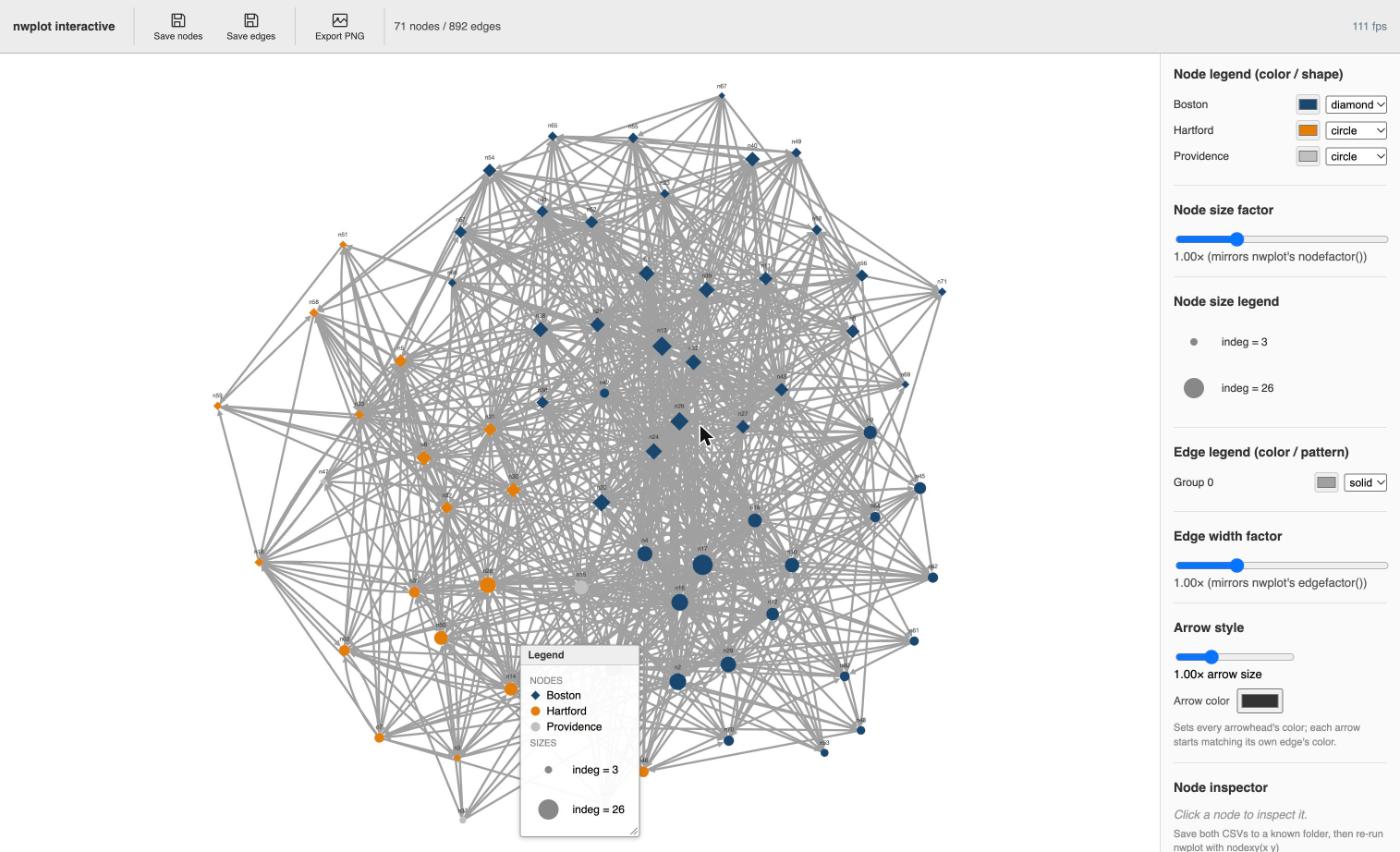
Still image of the view when it opens. If the live view above does not load (it needs JavaScript), this is what it shows.
What to try
- Drag a node. Press on a symbol and move it; its ties follow. Move one of the large symbols away from the center and watch how many ties go with it. Click a node (without moving it) to see its label, group, color, shape, size and position in the inspector at the bottom of the side panel.
- Click a color swatch in the node legend to recolor everybody in that group at once; the drop-down next to it changes the shape of the group. Providence has only three lawyers, so it is a good group to recolor. (The legend box on the canvas is the one to read for shapes: the drop-down in the side panel shows “mixed” for a group whose members have different shapes.)
- Move the sliders for node size and edge width. They correspond to the options
nodefactor()andedgefactor()ofnwplot, so a value you like can be typed into the next call. Thin lines make the nodes show through; a pattern that disappears when the lines are thin was carried by the number of lines. - Move the legend box on the canvas out of the way before you export a picture.
- Save. Save nodes and Save edges write two small CSV files (
nwedit_nodes.csvandnwedit_edges.csv) with positions, colors, shapes and the slider values. In most browsers they end up in your Downloads folder. Export PNG writes a picture of what you see, including the legend.
The page is a demonstration of the view. It has no data entry, and what you change is not stored on this site.
The Stata commands
The page above was written by these commands (fname() needs core 3.4.0 or later; the data set
lazega is in the repository and is loaded with nwwebuse):
. nwwebuse lazega, nwclear
. nwdegree lazega_adv, generate(outdeg indeg)
. set seed 42
. nwplot lazega_adv, color(office, colorpalette(navy dkorange gs12))       ///
>     symbol(practice) size(indeg) label(_nwnode) edgefactor(0.4)          ///
>     generate(x y) interactive noopen fname(lazega_advice_interactive)
generate(x y)keeps the coordinates thatnwplotcomputed, so that the layout can be recovered.set seed 42makes the starting layout repeatable (it starts from random positions).interactivebuilds the page.noopenwrites it without opening Stata’s viewer window; leavenoopenout to have the viewer open by itself.fname()is the file to write; its path is displayed and returned inr(fname).
Bringing your edits back into Stata
The browser is for looking; a figure for print is better made in Stata, where it can be reproduced. Read the two CSV
files back with importcoords() and edgeimport(), and tell nwplot where the nodes were with nodexy():
. nwplot lazega_adv, nodexy(x y)                                         ///
>     importcoords("nwedit_nodes.csv") edgeimport("nwedit_edges.csv")    ///
>     color(office, colorpalette(navy dkorange gs12))                    ///
>     symbol(practice) size(indeg) label(_nwnode) scheme(s1mono)         ///
>     labelopt(mlabsize(tiny)) export("lazega_advice_final.pdf") replace
The edits are matched to the nodes by row number, so run this on the same network, with the same sort order and the
same if and in restrictions. The slider for node size is converted so that the static plot has the proportions
of the view; an explicit nodefactor() or edgefactor() wins over the saved values. The
visualization tutorial
runs this step on a saved pair of files and shows the result, and nwplot lists all
options.
Source and licence
- Data: Lazega, E. (2001), The Collegial Phenomenon, Oxford University Press; Lazega, E. and van Duijn, M. (1997), Social Networks 19, 375-397. See the data sets page.
- The page was produced with nwcommands, which is free software under the GNU General Public License, version 3. The file contains the drawing library Cytoscape.js and other open-source code under the MIT license (the notices are in the file).